Experiment 13
Time-Series Analysis Using Moving Average in WEKA
Aim
To understand and implement time-series analysis using moving average in weka using WEKA data mining tool.
Procedure
Time-Series Analysis with Moving Average in WEKA is usually done using the time series forecasting package that extends WEKA's functionality. The Moving Average (MA) technique helps smooth time-series data and can also be used for prediction.
1. Install the Time Series Forecasting Package
- Open WEKA GUI Chooser → Tools → Package Manager.
- Search for timeSeriesForecasting (WEKA package).
- Install and restart WEKA.
2. Load Time-Series Data
- Format: .arff or .csv.
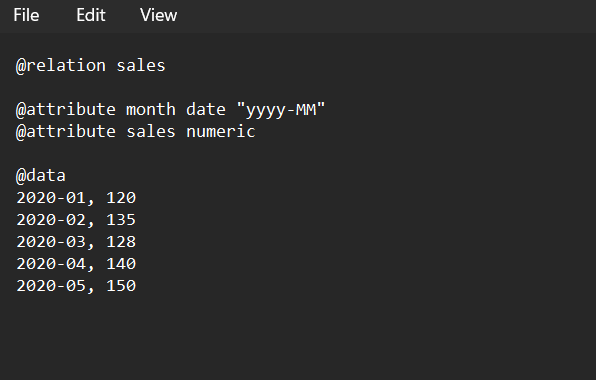
- Example (monthly sales data):
@relation sales
@attribute month date "yyyy-MM"
@attribute sales numeric

@data
2020-01, 120
2020-02, 135
2020-03, 128
2020-04, 140
2020-05, 150
The date/time attribute is required.
3. Open the Forecasting Environment
- From WEKA Explorer → Tools → Time Series Forecasting.
4. Configure Forecasting
- Select the target variable (e.g., sales).
- Choose the lag creation (lags are past values used for prediction).
- In Base Forecaster, choose:
- weka.classifiers.timeseries.core.TSLagMaker (handles time-based lags).
- For moving average, you can use:
- weka.classifiers.functions.SimpleLinearRegression (with lagged values).
- Or specify moving average window under lag settings.
5. Moving Average Setup
- In LagMaker, set time lag length (e.g., 3 for 3-month moving average).
- WEKA will then create new attributes like:
- sales_lag1 (previous month),
- sales_lag2, sales_lag3.
- The model will use these lagged values to compute a moving average forecast.
6. Run the Forecast
- Click Start forecasting.
- WEKA will output predictions for future time steps along with actual values.
Output
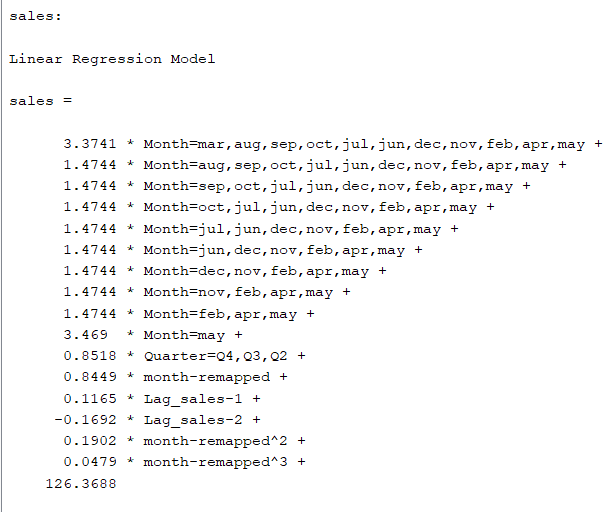
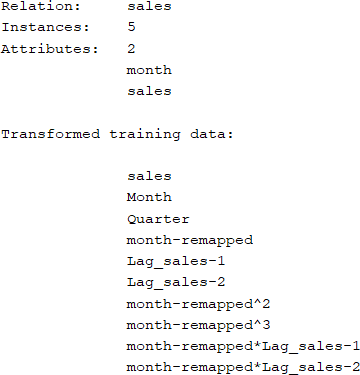
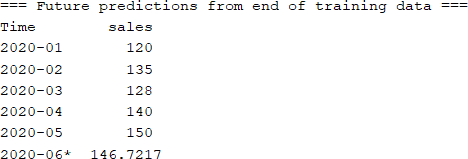
Result
The experiment was successfully executed, and the expected output was obtained using WEKA.