Experiment 05
Implement Apriori Algorithm in WEKA
Aim
To understand and implement apriori algorithm in weka using WEKA data mining tool.
Procedure
Launch WEKA
- Open WEKA → Click on Explorer
Load Your Dataset
- Go to the Preprocess tab
- Click Open File…
- Load a dataset in .arff or .csv format (preferably with nominal attributes only)
- Example: weather.nominal.arff (comes with WEKA)
Verify Attribute Types
- Ensure your attributes are nominal (not numeric)
- If needed, convert numeric to nominal:
- Use Filter → unsupervised → attribute → NumericToNominal
Go to the Associate Tab
- Click the Associate tab
- Click Choose → Select weka.associations.Apriori
Configure the Apriori Algorithm (Optional)
- Click on Apriori to adjust parameters:
- LowerBoundMinSupport: minimum support (e.g., 0.1 for 10%)
- MinMetric: minimum confidence (e.g., 0.9 for 90%)
- NumRules: number of rules to generate (e.g., 10)
Run the Algorithm
- Click Start
- WEKA will display the generated rules in the result output
Interpret the Output
Example:
Best rules found:
Outlook=Sunny ⇒ Play=No (conf: 0.8)

Humidity=High ⇒ Play=No (conf: 0.75)

Windy=False Play=Yes (conf: 0.6)
Each rule has support and confidence. These help you understand how frequent and reliable the rule is.
Save the Results (Optional)
Example of Association Rule Mining
Dataset (Transactions)
| TID | Items |
|---|---|
| 1 | Milk, Bread |
| 2 | Milk, Bread, Butter |
| 3 | Bread, Butter |
| 4 | Milk, Bread, Butter |
Step 1: Calculate Support
Support(X) = Fraction of transactions containing X
Rule:
Milk ⇒ Bread
Transactions with Milk and Bread together:
- T1: Milk, Bread ✓
- T2: Milk, Bread, Butter ✓
- T4: Milk, Bread, Butter ✓
text{Count(Milk & Bread)} = 3
- Total Transactions: 4
Support(Milk ⇒ Bread)=3/4=0.75=75%
Step 2: Calculate Confidence
Confidence(X⇒Y) = Probability of Y when X occurs
Confidence(Milk ⇒ Bread) = {Support(Milk & Bread)}/{Support(Milk)}
- Transactions with Milk:
- T1 ✓
- T2 ✓
- T4 ✓
Support(Milk)=3/4=0.75
Confidence(Milk⇒Bread)=(3/4)/(3/4)=1.0=100%
Step 1: Find Frequent Itemsets
- {Milk, Bread} → Support = 3/4 = 75%
- {Bread, Butter} → Support = 3/4 = 75%
Step 2: Generate Rules
- Milk ⇒ Bread
- Support = 75%
- Confidence = 100%
- Bread ⇒ Butter
- Support = 75%
- Confidence = 75%
Output
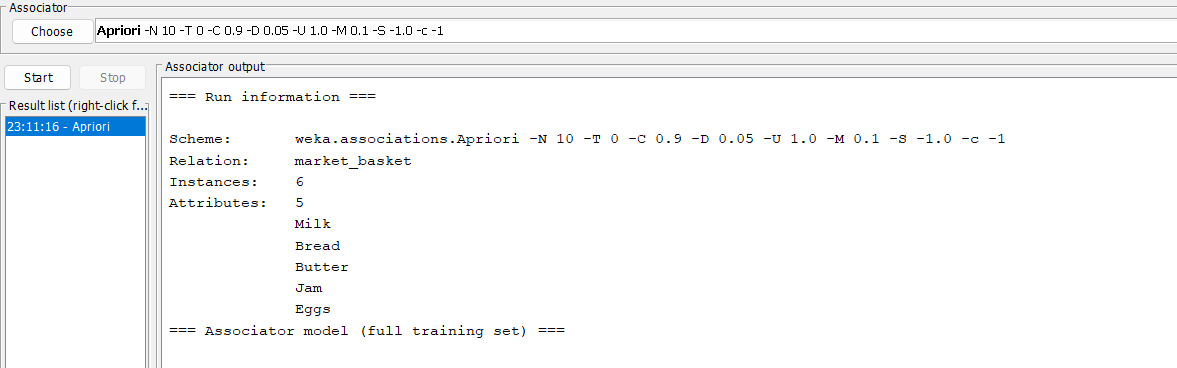
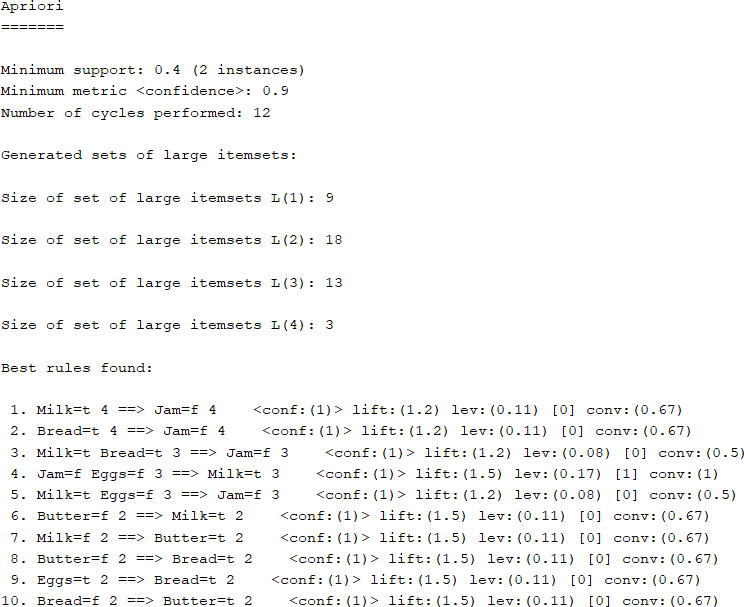
Result
The experiment was successfully executed, and the expected output was obtained using WEKA.